





























.avif)










Every GTM team has logic that is entirely custom to their business.
Your email waterfall isn't the same as anyone else's — you have your own preferred data providers, your own fallback order, your own rules on what you can and can't enrich. Your account scoring model reflects months of experimentation. Your qualification criteria encodes hard-won knowledge about what actually converts. Your suppression logic checks DNC lists and customer accounts against custom fields, because nothing is ever just one step. Miss one, and you've emailed a prospect who opted out or a customer mid-renewal.
This logic is what separates a high-performing GTM motion from a generic one. The problem is that only ops knows it, and it lives everywhere. Every new workflow routes through them, and the logic itself is rebuilt Clay table after table. When you need to swap a provider or update scoring criteria, you're making the same change in 15 places, hoping you don't miss one.
The logic that makes your GTM unique becomes the thing that's hardest to scale.
That’s why today we’re launching Functions – reusable workflow components that let you codify the GTM logic that is custom to your business, centralize it, and scale it across every table and audience in Clay. Your best logic becomes your org's default.
What are Functions?
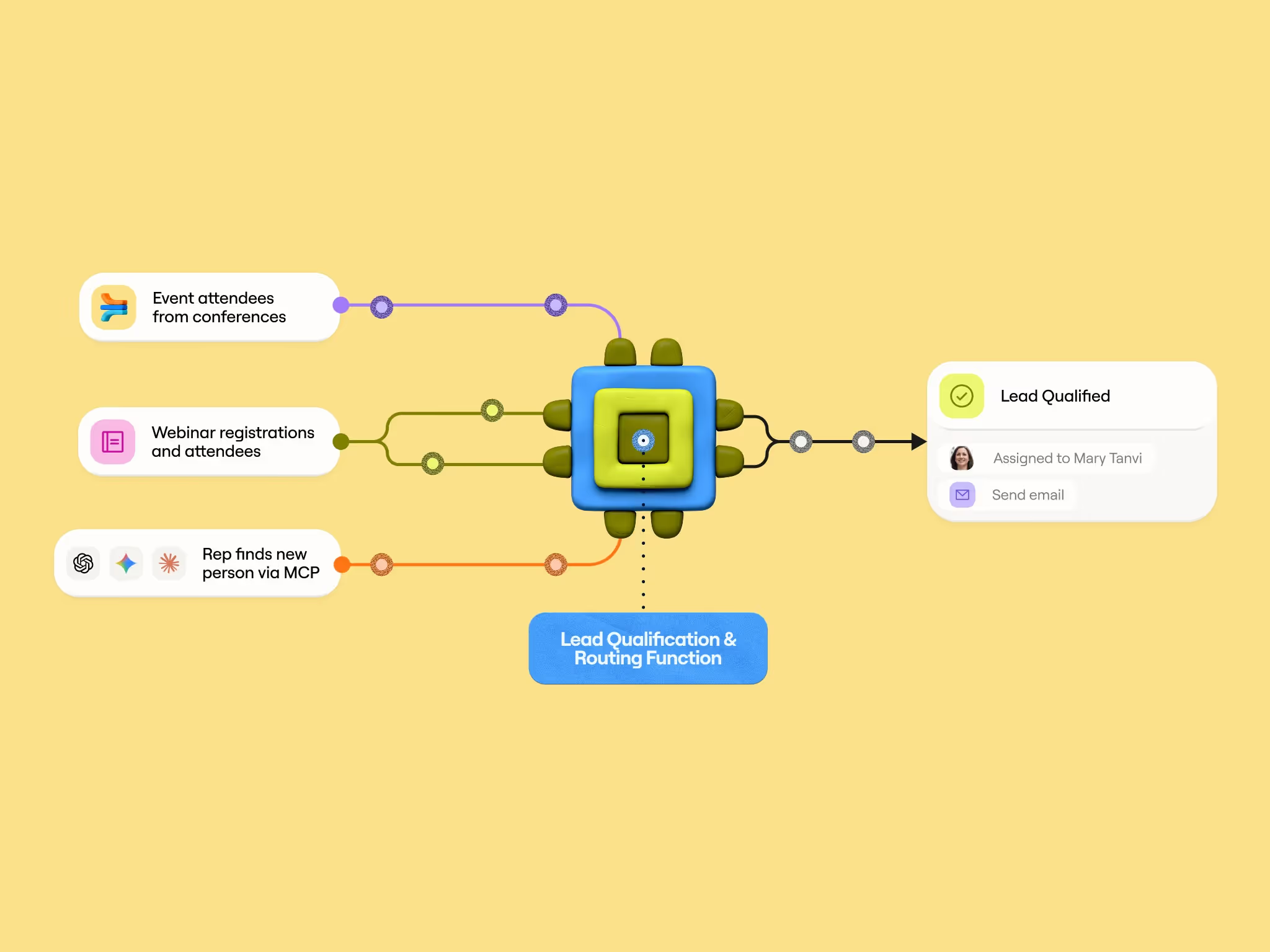
Functions are reusable workflows that take a defined set of inputs, run a sequence of enrichments, and produce structured outputs — all from a single column. Instead of rebuilding the same enrichment logic across dozens of tables, you build it once as a function and reference it everywhere.
Here’s why that matters:
Anyone can use them, but you control the logic. Functions lets Ops teams enable more marketers, SDRs, and other non-power users to run workflows on their own — using logic you've already built and validated. These users can call on functions to perform tasks without risk of breaking the systems behind it. Soon, anyone can access these functions via MCP in places like Claude and ChatGPT.
Centralized governance with changes propagating instantly. When you edit a function and publish, every table that references it picks up the change. No hunting through workbooks, no missed updates, no version inconsistency. Edit Mode gives you a sandboxed environment to test changes before you publish, so you can safely iterate without disrupting live workflows.
Share functions across workspaces. This one is for our agency partners. If you have enrichment logic that you use regularly for multiple clients, use a shareable link to duplicate functions into other workspaces and reduce time rebuilding the same workflows. Check out our functions library for more best practice functions from the Solutions Engineering team at Clay.
One function replaces an entire column group. One function column replaces an entire column group. A 12-step enrichment sequence that used to sprawl across a dozen columns now collapses into one. Your tables stay clean, you stay well under column limits, and navigation is dramatically faster — particularly when you're working with 40K+ rows.
Think of it this way: if enrichments are atoms, functions are molecules — compound, reusable building blocks that snap into any workflow.
Three ways teams are using Functions
Contact and account enrichment
Contact and account enrichment is the most universal Functions use case. These workflows are never simple enough for one step — typically contact enrichment requires a CRM check, unique data points, waterfalls, before determining if it can be exported back to your CRM.
Faris Sumadi, a demand generation engineer at HubSpot, manages Clay for a team of 50+ users — including 30 field and regional marketers, a sales ops team, and a manual enrichment team. Before Functions, every enrichment request flowed through Faris directly.
Today, Faris maintains five core contact and account enrichment functions that power HubSpot's enrichment infrastructure.
"If other teams want to use Clay, we point them directly to our reusable functions that are actively maintained. This allows them to eliminate redundant enrichment tasks and focus on their value-added workflows inside Clay. Functions end up eliminating the learning curve and helps update our CRM reliably," said Faris.
What makes this work at enterprise scale is governance. Faris embedded HubSpot's legal compliance rules directly into the functions — contacts in restricted countries are automatically blocked from enrichment. No marketer needs to know or remember these rules.
The result: 10 marketers across regions (EMEA, APAC, Americas) now self-serve their own enrichment workflows by simply referencing the same five functions. When Faris onboards a new marketing team, he sends them a Loom walkthrough and they're running enrichment independently the same day. Nobody rebuilds logic.
"It allowed us to give access to Clay to a team of 10 regional marketers that are running campaigns and field events on contacts. And I could just sleep at night knowing that because they're using the functions, whatever data they're creating in the CRM follows the same flow every time," said Faris.
Start using these account enrichment functions in your workspace.
Signal Detection
Christian Haskins is a Senior Growth Manager at Rippling, where Clay powers a high-volume outbound motion that runs hundreds of thousands of unique prospects per month and generates millions in qualified pipeline. He's built around 10 core functions that power enrichment and signal detection across 30+ campaigns serving six business units, from US core sales to international teams in Australia, UK, and Canada.
Each function handles a discrete enrichment or signal: one identifies which specific countries a company has employees in, another breaks down headcount by US state, others detect job changes, promotions, and headcount growth. These functions run on every prospect that enters the system, building a rich profile that determines which campaign they're routed to and what messaging they receive. A prospect at a company with employees in Germany and France gets outreach referencing global payroll complexity. One at a company rapidly hiring across US states gets messaging around state-specific labor laws and pay transparency regulations. The result is 2x the performance of generic, non-enriched copy.
"Without these functions, you could say the campaigns wouldn't work," says Christian. "They're our lifeblood, the backbone of our outbound." Since every campaign references shared functions, updating a signal — say, a better way to extract global employee data — takes one edit instead of 30. "Instead of having to make that change in 10 different places, we can just make it in one and have it reflected everywhere across all the business units. That saves me countless long nights."
What started as a way to streamline his own workflows now powers teams that aren't even in Clay. Six business units access function-enriched data through an internal app Haskins built on top of Clay's infrastructure.
“Without Clay Functions I would literally hate my life. Functions let me treat enrichments like code -- modular, reusable logic blocks. If you're a GTM engineer and not using Clay functions you're behind," said Christian.
AI Outbound: Generate Personalized Emails
Functions aren't just for enriching or orchestrating data — they're for acting on it. At Clay, our GTM Ops team uses a function that pulls together Snowflake, SFDC, and third-party data to identify personas and generate personalized emails accordingly. Based on each contact's context, the function produces high-signal, insight-led messages from a single column.
"With Functions we can centrally manage and reuse core parts of our GTM engine, like message drafting," says Osman Sheikhnureldin, Head of GTM Ops at Clay. "When we make updates to add additional context or refine prompts, the optimizations are automatically rolled out to all of the workflows using the function."
Functions also change who can build. Marketers across multiple campaigns reference this one function and get deeply personalized copy without building any of the logic themselves.
"Functions allow us to put more power in the hands of our marketers," Osman adds. "With Functions to centrally manage contact and account creation, as well as qualification and routing, marketers can self-serve workflows and campaigns and only need to know what inputs are required instead of navigating through the entire workflow."
Functions unlocks centralized orchestration with AI
As AI becomes embedded in more GTM workflows, the teams that win will be the ones with the best context. Functions are how you centralize that context.
Every function you build is a codified, governed piece of your team's institutional knowledge: your provider preferences, your qualification criteria, your compliance rules, your copywriting frameworks. When that logic lives in a function rather than scattered across dozens of tables, it becomes a scalable asset — one that any team member (or any AI agent) can call reliably and get consistent results.
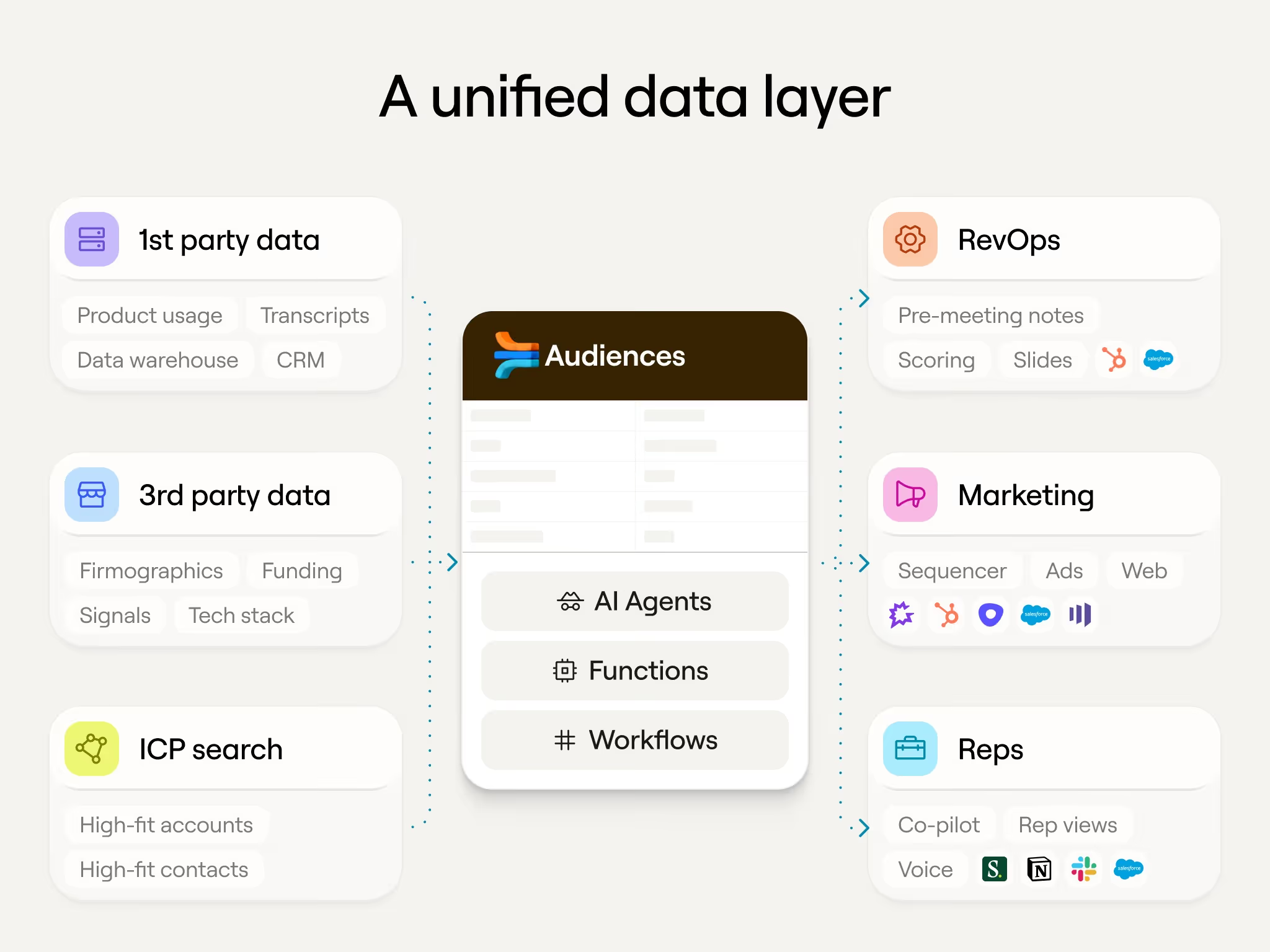
This is just the beginning. Functions today work across every table and workbook in Clay. You can start calling them into your Audiences for always-on enrichment at the data layer. They'll be callable externally — from MCP-enabled tools, rep copilots, and other applications in your stack. And as Clay's workflow capabilities continue to evolve, functions will be the governed, composable building blocks at the center of it all.
Your GTM logic shouldn't live in one person's head or one team's workbook. Functions make it your org's infrastructure.
Get started
Functions are available today at no additional cost on all modern and legacy paid plans. Start using Functions from our library or check out our Clay University course and start building in your workspace today.
Every GTM team has logic that is entirely custom to their business.
Your email waterfall isn't the same as anyone else's — you have your own preferred data providers, your own fallback order, your own rules on what you can and can't enrich. Your account scoring model reflects months of experimentation. Your qualification criteria encodes hard-won knowledge about what actually converts. Your suppression logic checks DNC lists and customer accounts against custom fields, because nothing is ever just one step. Miss one, and you've emailed a prospect who opted out or a customer mid-renewal.
This logic is what separates a high-performing GTM motion from a generic one. The problem is that only ops knows it, and it lives everywhere. Every new workflow routes through them, and the logic itself is rebuilt Clay table after table. When you need to swap a provider or update scoring criteria, you're making the same change in 15 places, hoping you don't miss one.
The logic that makes your GTM unique becomes the thing that's hardest to scale.
That’s why today we’re launching Functions – reusable workflow components that let you codify the GTM logic that is custom to your business, centralize it, and scale it across every table and audience in Clay. Your best logic becomes your org's default.
What are Functions?
Functions are reusable workflows that take a defined set of inputs, run a sequence of enrichments, and produce structured outputs — all from a single column. Instead of rebuilding the same enrichment logic across dozens of tables, you build it once as a function and reference it everywhere.
Here’s why that matters:
Anyone can use them, but you control the logic. Functions lets Ops teams enable more marketers, SDRs, and other non-power users to run workflows on their own — using logic you've already built and validated. These users can call on functions to perform tasks without risk of breaking the systems behind it. Soon, anyone can access these functions via MCP in places like Claude and ChatGPT.
Centralized governance with changes propagating instantly. When you edit a function and publish, every table that references it picks up the change. No hunting through workbooks, no missed updates, no version inconsistency. Edit Mode gives you a sandboxed environment to test changes before you publish, so you can safely iterate without disrupting live workflows.
Share functions across workspaces. This one is for our agency partners. If you have enrichment logic that you use regularly for multiple clients, use a shareable link to duplicate functions into other workspaces and reduce time rebuilding the same workflows. Check out our functions library for more best practice functions from the Solutions Engineering team at Clay.
One function replaces an entire column group. One function column replaces an entire column group. A 12-step enrichment sequence that used to sprawl across a dozen columns now collapses into one. Your tables stay clean, you stay well under column limits, and navigation is dramatically faster — particularly when you're working with 40K+ rows.
Think of it this way: if enrichments are atoms, functions are molecules — compound, reusable building blocks that snap into any workflow.
Three ways teams are using Functions
Contact and account enrichment
Contact and account enrichment is the most universal Functions use case. These workflows are never simple enough for one step — typically contact enrichment requires a CRM check, unique data points, waterfalls, before determining if it can be exported back to your CRM.
Faris Sumadi, a demand generation engineer at HubSpot, manages Clay for a team of 50+ users — including 30 field and regional marketers, a sales ops team, and a manual enrichment team. Before Functions, every enrichment request flowed through Faris directly.
Today, Faris maintains five core contact and account enrichment functions that power HubSpot's enrichment infrastructure.
"If other teams want to use Clay, we point them directly to our reusable functions that are actively maintained. This allows them to eliminate redundant enrichment tasks and focus on their value-added workflows inside Clay. Functions end up eliminating the learning curve and helps update our CRM reliably," said Faris.
What makes this work at enterprise scale is governance. Faris embedded HubSpot's legal compliance rules directly into the functions — contacts in restricted countries are automatically blocked from enrichment. No marketer needs to know or remember these rules.
The result: 10 marketers across regions (EMEA, APAC, Americas) now self-serve their own enrichment workflows by simply referencing the same five functions. When Faris onboards a new marketing team, he sends them a Loom walkthrough and they're running enrichment independently the same day. Nobody rebuilds logic.
"It allowed us to give access to Clay to a team of 10 regional marketers that are running campaigns and field events on contacts. And I could just sleep at night knowing that because they're using the functions, whatever data they're creating in the CRM follows the same flow every time," said Faris.
Start using these account enrichment functions in your workspace.
Signal Detection
Christian Haskins is a Senior Growth Manager at Rippling, where Clay powers a high-volume outbound motion that runs hundreds of thousands of unique prospects per month and generates millions in qualified pipeline. He's built around 10 core functions that power enrichment and signal detection across 30+ campaigns serving six business units, from US core sales to international teams in Australia, UK, and Canada.
Each function handles a discrete enrichment or signal: one identifies which specific countries a company has employees in, another breaks down headcount by US state, others detect job changes, promotions, and headcount growth. These functions run on every prospect that enters the system, building a rich profile that determines which campaign they're routed to and what messaging they receive. A prospect at a company with employees in Germany and France gets outreach referencing global payroll complexity. One at a company rapidly hiring across US states gets messaging around state-specific labor laws and pay transparency regulations. The result is 2x the performance of generic, non-enriched copy.
"Without these functions, you could say the campaigns wouldn't work," says Christian. "They're our lifeblood, the backbone of our outbound." Since every campaign references shared functions, updating a signal — say, a better way to extract global employee data — takes one edit instead of 30. "Instead of having to make that change in 10 different places, we can just make it in one and have it reflected everywhere across all the business units. That saves me countless long nights."
What started as a way to streamline his own workflows now powers teams that aren't even in Clay. Six business units access function-enriched data through an internal app Haskins built on top of Clay's infrastructure.
“Without Clay Functions I would literally hate my life. Functions let me treat enrichments like code -- modular, reusable logic blocks. If you're a GTM engineer and not using Clay functions you're behind," said Christian.
AI Outbound: Generate Personalized Emails
Functions aren't just for enriching or orchestrating data — they're for acting on it. At Clay, our GTM Ops team uses a function that pulls together Snowflake, SFDC, and third-party data to identify personas and generate personalized emails accordingly. Based on each contact's context, the function produces high-signal, insight-led messages from a single column.
"With Functions we can centrally manage and reuse core parts of our GTM engine, like message drafting," says Osman Sheikhnureldin, Head of GTM Ops at Clay. "When we make updates to add additional context or refine prompts, the optimizations are automatically rolled out to all of the workflows using the function."
Functions also change who can build. Marketers across multiple campaigns reference this one function and get deeply personalized copy without building any of the logic themselves.
"Functions allow us to put more power in the hands of our marketers," Osman adds. "With Functions to centrally manage contact and account creation, as well as qualification and routing, marketers can self-serve workflows and campaigns and only need to know what inputs are required instead of navigating through the entire workflow."
Functions unlocks centralized orchestration with AI
As AI becomes embedded in more GTM workflows, the teams that win will be the ones with the best context. Functions are how you centralize that context.
Every function you build is a codified, governed piece of your team's institutional knowledge: your provider preferences, your qualification criteria, your compliance rules, your copywriting frameworks. When that logic lives in a function rather than scattered across dozens of tables, it becomes a scalable asset — one that any team member (or any AI agent) can call reliably and get consistent results.
This is just the beginning. Functions today work across every table and workbook in Clay. You can start calling them into your Audiences for always-on enrichment at the data layer. They'll be callable externally — from MCP-enabled tools, rep copilots, and other applications in your stack. And as Clay's workflow capabilities continue to evolve, functions will be the governed, composable building blocks at the center of it all.
Your GTM logic shouldn't live in one person's head or one team's workbook. Functions make it your org's infrastructure.
Get started
Functions are available today at no additional cost on all modern and legacy paid plans. Start using Functions from our library or check out our Clay University course and start building in your workspace today.
.png)











.avif)












.avif)











.avif)

.avif)